AWS VPC & Azure Subnet Calculator — usable IPs after reserved addresses
An AWS/Azure VPC subnet calculator splits a VPC or VNet CIDR block into per-subnet ranges and shows how many IP addresses are actually usable after each cloud provider reserves 5 addresses per subnet — so you don’t plan an Availability Zone with addresses you cannot assign to anything.
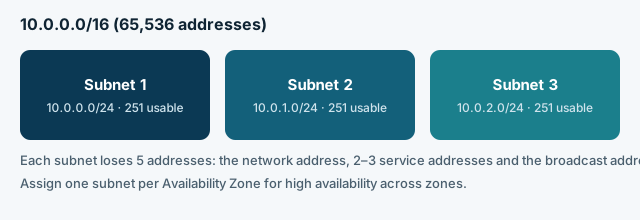
VPC / VNet subnet calculator
Pick a provider, enter your VPC/VNet CIDR, the subnet size and how many subnets you need (one per Availability Zone is typical).
Reserved per subnet — In subnet 1: 10.0.0.0, 10.0.0.1, 10.0.0.2, 10.0.0.3 and 10.0.0.255 (broadcast) — 5 addresses, not usable.
| Subnet | CIDR | Usable range | Usable IPs |
|---|---|---|---|
| Subnet 1 | 10.0.0.0/24 | 10.0.0.4 – 10.0.0.254 | 251 |
| Subnet 2 | 10.0.1.0/24 | 10.0.1.4 – 10.0.1.254 | 251 |
| Subnet 3 | 10.0.2.0/24 | 10.0.2.4 – 10.0.2.254 | 251 |
Reserved IPs in AWS vs Azure
Both providers reserve exactly 5 addresses per subnet — the first four and the last — but the first four mean slightly different things.
| Offset | AWS VPC | Azure VNet |
|---|---|---|
| .0 | Network address | Network address |
| .1 | Reserved for the VPC router | Reserved for the default gateway |
| .2 | Reserved by AWS for DNS | Reserved to map Azure DNS IPs |
| .3 | Reserved for future use | Reserved to map Azure DNS IPs |
| Last address | Broadcast address (unused in a VPC) | Network broadcast address |
Source: AWS, “Subnet CIDR blocks” (docs.aws.amazon.com/vpc/latest/userguide/subnet-sizing.html) and Microsoft, “Azure Virtual Network FAQ” (learn.microsoft.com/azure/virtual-network/virtual-networks-faq) — both checked 25 Oct 2026. AWS allows subnet prefixes from /16 to /28; Azure documents /29 as the smallest and /2 as the largest IPv4 subnet.
Choosing a VPC/VNet size
A /16 gives 65,536 addresses — enough to carve out dozens of /24 subnets, one or more per Availability Zone, with room to grow. Many teams start smaller than they think they need: once a VPC/VNet is created, its CIDR block generally cannot be resized, while adding more subnets or a second, non-overlapping CIDR block later is usually possible. Keep subnets non-overlapping and leave gaps between them if you expect to add more AZs later.
Frequently asked questions
Why can’t I use all the addresses in my subnet?
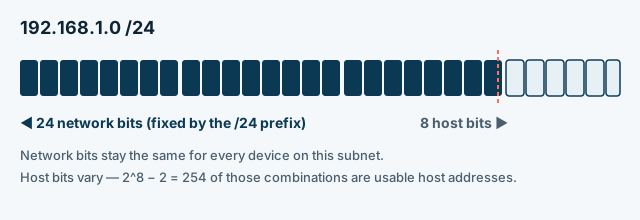
Both AWS and Azure reserve the first four addresses and the last address of every subnet for networking services (gateway, DNS mapping, broadcast), regardless of how big the subnet is. A /24 therefore has 251 usable addresses instead of 254.
Is the reservation the same for every subnet size?
Yes — it is always exactly 5 addresses per subnet (first four plus the last), whether the subnet is a /28 with 11 usable addresses or a /16 with 65,531.
Can I resize a VPC or VNet after creating it?
Not the original CIDR block in most cases. Both providers instead let you add secondary, non-overlapping CIDR blocks to grow the address space without recreating the network — check your provider’s current documentation before planning around this.
Should every subnet be the same size?
Not necessarily. Many designs use larger subnets for workloads that scale out (like application servers) and smaller ones for things like load balancers or a handful of management hosts, planned with variable-length subnetting (VLSM) rather than one fixed size for every subnet.
This calculator is part of SeaMeWe4 Net Tools, an independent set of free networking calculators. It is not affiliated with, endorsed by or operated for Amazon Web Services, Microsoft Azure, or any cloud provider.
Was this page helpful?
One tap tells us which guides need more detail.
Thanks for your feedback!