Subnet Calculator
for IPv4 networks
A subnet calculator splits an IPv4 network into smaller address ranges by applying a subnet mask or CIDR prefix, instantly returning the network address, broadcast address, usable host range and total host count for that range — no sign-up, no install, results update as you type.
Open the calculator
IPv4 subnet calculator
Enter an IP address and drag the slider — or type a dotted-decimal mask — to see every value for that subnet.
| Network address | 192.168.1.0 | |
| Broadcast address | 192.168.1.255 | |
| First usable host | 192.168.1.1 | |
| Last usable host | 192.168.1.254 | |
| Usable hosts | 254 | |
| Wildcard mask | 0.0.0.255 | |
| Mask in binary | 11111111.11111111.11111111.00000000 | |
| IP class | C | |
| Address type | Private (RFC 1918) |
Subnet mask table
The most commonly used prefixes, their dotted-decimal mask, and how many addresses each one holds.
| CIDR prefix | Subnet mask | Total addresses | Usable hosts |
|---|---|---|---|
| /8 | 255.0.0.0 | 16,777,216 | 16,777,214 |
| /16 | 255.255.0.0 | 65,536 | 65,534 |
| /20 | 255.255.240.0 | 4,096 | 4,094 |
| /22 | 255.255.252.0 | 1,024 | 1,022 |
| /24 | 255.255.255.0 | 256 | 254 |
| /25 | 255.255.255.128 | 128 | 126 |
| /26 | 255.255.255.192 | 64 | 62 |
| /27 | 255.255.255.224 | 32 | 30 |
| /28 | 255.255.255.240 | 16 | 14 |
| /29 | 255.255.255.248 | 8 | 6 |
| /30 | 255.255.255.252 | 4 | 2 |
| /31 | 255.255.255.254 | 2 | 2 |
| /32 | 255.255.255.255 | 1 | 1 |
How the calculator works
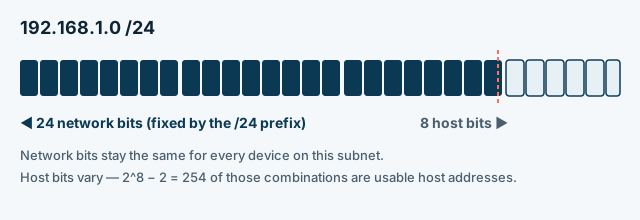
The calculator reads the prefix length (or the dotted-decimal mask you type, which it converts to the same prefix) and uses it to split the 32-bit IPv4 address into a fixed network portion and a variable host portion. It then applies a bitwise AND between the address and the mask to find the network address, flips the host bits to find the broadcast address, and everything in between is the usable host range — the same arithmetic described in RFC 4632.
More networking tools
The calculator above covers IPv4 subnetting. These related tools are being added to SeaMeWe4 Net Tools next.
Frequently asked questions
What does a subnet mask actually do?
A subnet mask marks which bits of an IPv4 address identify the network and which bits identify the host. Bits set to 1 (e.g. 255.255.255.0) are the network portion; the remaining bits are available for host addresses inside that subnet.
How many usable hosts does a /24 have?
A /24 has 256 total addresses, but the first (network) and last (broadcast) address in the range can't be assigned to a device, so a standard /24 gives 254 usable host addresses. The same -2 rule applies to every prefix except /31 and /32, which have special uses.
Why do we subtract 2 host addresses?
The lowest address in any subnet identifies the network itself, and the highest address is reserved as the broadcast address for that subnet — neither can be assigned to an individual host. That leaves total addresses minus 2 as usable.
What is the difference between a subnet mask and CIDR notation?
They describe the same split in two formats. A subnet mask is written as four decimal numbers (255.255.255.0); CIDR notation writes the prefix length directly after the IP address as a slash and a number (/24). Both represent 24 network bits in this example.
Fiber latency estimator
Light in optical fiber travels at roughly two-thirds of its speed in a vacuum, and cables never run in a straight line. Adjust the route factor to see how detours add delay.
- Great-circle distance
- —
- Estimated cable length
- —
- One-way in fiber
- —
- Round trip in a vacuum
- —
Numbers behind the latency estimate
Why real-world ping is always higher than the physics floor.
| Factor | Typical value | Effect on latency |
|---|---|---|
| Speed of light in fiber | ≈ 204,000 km/s (refractive index ≈ 1.47) | About 4.9 µs per km, one way. |
| Route factor | 1.2–1.6× great-circle distance | Cables follow coastlines, avoid hazards and stop at landing stations. |
| Terrestrial backhaul | Tens to hundreds of km | Data still has to reach the landing station and the data center inland. |
| Routing and equipment | A few ms | Each router, switch and amplifier adds a little processing delay. |
| Congestion | 0 to 100+ ms | Busy links queue packets; this is where “lag” spikes usually come from. |
Latest articles
Was this calculator helpful?
One tap tells us which guides need more detail.
Thanks for your feedback!